Instant analytics
for Supabase

Connect your database and let AI track metrics that actually matter.
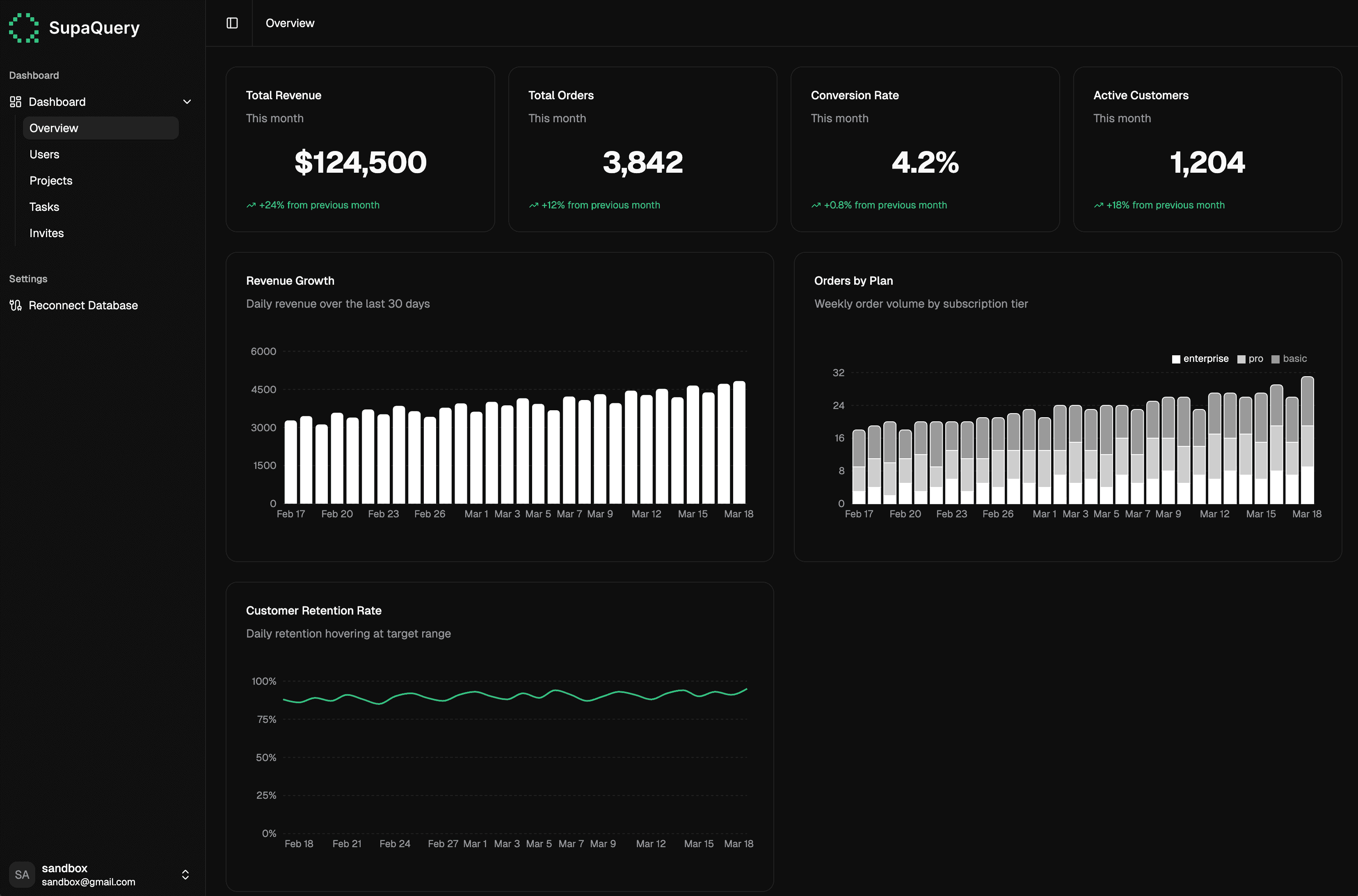
Codexia Dashboard

Used by businesses backed by:

How It Works

We learn your business

SupaQuery researches your industry and analyzes your data to identify metrics that matter to your growth.

Quick Integration

Three-step plugin takes under 30 seconds.

Instant Schema Mapping

SupaQuery AI introspects your tables and maps your database schema to your business context

Business intent captured ✓

Database connected ✓

Schema mapped ✓

Integrating...

Deploy

Instant Schema Mapping

SupaQuery AI introspects your tables and maps your database schema to your business context

Business intent captured ✓

Database connected ✓

Schema mapped ✓

Integrating...

Deploy

Instant Schema Mapping

SupaQuery AI introspects your tables and maps your database schema to your business context

Business intent captured ✓

Database connected ✓

Schema mapped ✓

Integrating...

Deploy

Secure, Read-only Bridge

Single, open-source SQL script with read-only access.

Secure, Read-only Bridge

Single, open-source SQL script with read-only access.

Secure, Read-only Bridge

Single, open-source SQL script with read-only access.

Features

Open-source integration

See the exact SQL script used to connect your database. We get read-only access to your public schema, and absolutely zero access to your auth schema

Audit the connection script yourself

No hidden code or obfuscated permissions

-- 1. Create the custom schema (invisible to the Supabase API)
CREATE SCHEMA IF NOT EXISTS founder_analytics;

-- 2. Create the read-only role (BYPASSRLS so it can read RLS-protected tables)
CREATE ROLE readonly_user WITH LOGIN PASSWORD 'EVPHZLRQlFgEPlfU' BYPASSRLS;
GRANT CONNECT ON DATABASE postgres TO readonly_user;

-- 3. Grant standard read-only access to the public schema
GRANT USAGE ON SCHEMA public TO readonly_user;
GRANT SELECT ON ALL TABLES IN SCHEMA public TO readonly_user;
ALTER DEFAULT PRIVILEGES IN SCHEMA public GRANT SELECT ON TABLES TO readonly_user;

-- 4. Create the secure bridge view (runs as postgres admin)
CREATE OR REPLACE VIEW founder_analytics.auth_metrics AS
SELECT id, created_at, raw_user_meta_data
FROM auth.users;

-- 5. Grant our role access strictly to the new schema and view
GRANT USAGE ON SCHEMA founder_analytics TO readonly_user;
GRANT SELECT ON founder_analytics.auth_metrics TO

Audit the connection script yourself

No hidden code or obfuscated permissions

-- 1. Create the custom schema (invisible to the Supabase API)
CREATE SCHEMA IF NOT EXISTS founder_analytics;

-- 2. Create the read-only role (BYPASSRLS so it can read RLS-protected tables)
CREATE ROLE readonly_user WITH LOGIN PASSWORD 'EVPHZLRQlFgEPlfU' BYPASSRLS;
GRANT CONNECT ON DATABASE postgres TO readonly_user;

-- 3. Grant standard read-only access to the public schema
GRANT USAGE ON SCHEMA public TO readonly_user;
GRANT SELECT ON ALL TABLES IN SCHEMA public TO readonly_user;
ALTER DEFAULT PRIVILEGES IN SCHEMA public GRANT SELECT ON TABLES TO readonly_user;

-- 4. Create the secure bridge view (runs as postgres admin)
CREATE OR REPLACE VIEW founder_analytics.auth_metrics AS
SELECT id, created_at, raw_user_meta_data
FROM auth.users;

-- 5. Grant our role access strictly to the new schema and view
GRANT USAGE ON SCHEMA founder_analytics TO readonly_user;
GRANT SELECT ON founder_analytics.auth_metrics TO

Audit the connection script yourself

No hidden code or obfuscated permissions

-- 1. Create the custom schema (invisible to the Supabase API)
CREATE SCHEMA IF NOT EXISTS founder_analytics;

-- 2. Create the read-only role (BYPASSRLS so it can read RLS-protected tables)
CREATE ROLE readonly_user WITH LOGIN PASSWORD 'EVPHZLRQlFgEPlfU' BYPASSRLS;
GRANT CONNECT ON DATABASE postgres TO readonly_user;

-- 3. Grant standard read-only access to the public schema
GRANT USAGE ON SCHEMA public TO readonly_user;
GRANT SELECT ON ALL TABLES IN SCHEMA public TO readonly_user;
ALTER DEFAULT PRIVILEGES IN SCHEMA public GRANT SELECT ON TABLES TO readonly_user;

-- 4. Create the secure bridge view (runs as postgres admin)
CREATE OR REPLACE VIEW founder_analytics.auth_metrics AS
SELECT id, created_at, raw_user_meta_data
FROM auth.users;

-- 5. Grant our role access strictly to the new schema and view
GRANT USAGE ON SCHEMA founder_analytics TO readonly_user;
GRANT SELECT ON founder_analytics.auth_metrics TO

Pricing

Start free. Scale as you grow.

Zero-setup analytics for solo founders and growing startups. Stop writing SQL and start tracking growth.

Hobby

Free

for your first project

AI Schema Mapping

Instantly generate a full dashboard from your schema.

1 Supabase Project

Connect a single production or staging database.

Core Metrics

Track Standard KPIs like active users, signups, and growth rates.

24-hour Data Sync

Dashboards refresh automatically once a day

Community Support

Access to documentation and community resources.

Hobby

Free

for your first project

AI Schema Mapping

Instantly generate a full dashboard from your schema.

1 Supabase Project

Connect a single production or staging database.

Core Metrics

Track Standard KPIs like active users, signups, and growth rates.

24-hour Data Sync

Dashboards refresh automatically once a day

Community Support

Access to documentation and community resources.

Startup

$29

per month

Unlimited Projects

Connect all your Supabase environments and schemas.

Team Sharing

Invite co-founders and investors with secure, view-only links.

Custom AI Queries

Ask our AI specific questions about your data.

Real-Time Analytics

Live dashboard syncing with zero caching delays.

CSV Exports

Download your metrics for investor updates or offline analysis.

Priority Support

Direct, front-of-the-line email and Slack support.

Building something big?

SupaQuery scales with your ambition — from small teams to global engineering orgs.

Stop guessing.
Measure your growth.

SupaQuery gives teams actionable metrics to monitor their business performance.